Anthropic shipped an update this week that’s easy to undersell as “a browser extension got better.” It’s more interesting than that.
What actually shipped
Claude Cowork — the layperson-facing version of Claude’s agentic tooling, distinct from the developer-focused Claude Code — is now available directly in the Chrome side panel, as part of the existing Claude for Chrome extension. That’s the headline. The part worth sitting with is what changed underneath it.
Conversations you have in that side panel now become part of your actual Claude history, not a disposable browser session. Your skills and connectors carry over automatically. And — this is the piece that matters — a task you start in the Claude desktop app, web app, or mobile app can be picked up and continued inside the browser, and vice versa. The session belongs to your account, not to whichever device or window happened to be open when you started.
It’s rolling out to Max and Team subscribers now, with Pro plans getting access in the coming weeks. This builds on Claude Code already living in the same Chrome extension, and on Anthropic’s recent move to let you direct Cowork sessions from your phone — so the pattern across the last few months has been consistent: fewer separate tools, one continuous session that follows you across surfaces.
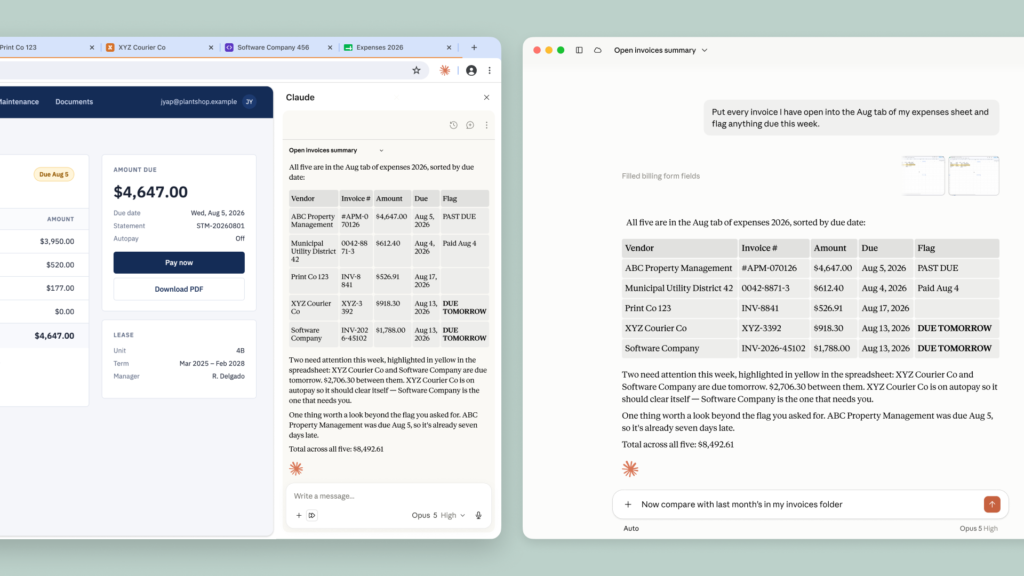
Anthropic’s own announcement shows this with a simple example: ask Claude, from the side panel, to pull every open invoice across several browser tabs into a spreadsheet and flag what’s due this week. Claude reads the tabs, fills in the sheet, and returns a short summary with the numbers that need attention. Nothing exotic — the kind of task most people do manually, in the browser, several times a week.
Why this is the pattern to watch
I’ve said this before about other product launches this year, and it keeps proving out: the interesting shift isn’t “AI can now do X inside a browser.” It’s that identity and continuity are becoming the product. The session isn’t tied to a device anymore — it’s tied to you. That’s a different architecture than “chatbot with more features,” and it’s the same direction most serious agent tooling has been heading for the past year: less “open an app and prompt it,” more “the agent already knows where you left off.”
That convergence is worth noticing regardless of which vendor ships it first. It tells you where the next round of product decisions — and the next round of IT policy decisions — are actually going to land.
The governance question, not the feature question
Here’s the lens I’d bring to this as someone who spends his day job thinking about IT governance for organizations that can’t afford to get this wrong: an agent operating inside your browser is an agent operating with your logins, your sessions, your access. That’s true whether it’s Claude, Copilot, or anything else with this shape. The capability is genuinely useful — filling out an expense sheet from five open tabs is a real time-saver, not a gimmick.
But the question worth asking before turning something like this on for a team isn’t “is this useful.” It almost always is. The question is: what does this agent have access to, and what’s the actual blast radius if it’s tricked into misusing that access — say, by a malicious page it’s asked to read. That’s not a knock on Anthropic specifically; it’s the same question I’d raise about any tool in this category, and it’s the first thing I’d walk a nonprofit or school client through before flipping the switch. Useful and low-risk aren’t the same conversation, and treating them as one is how organizations end up explaining an incident instead of preventing one.
If you’re evaluating this for your own team: start with a low-stakes, low-access account. Watch what it actually does before you hand it something that touches real financial or student data. The feature is good. The habit of asking what it can touch is better.