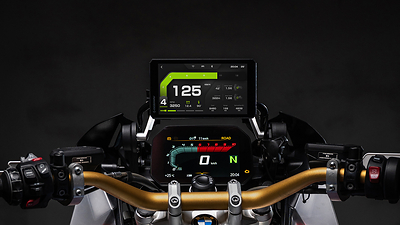
I own both of these devices, and I do not have a clean, one-device-wins answer. For everyday rides, the RiderNav R7M makes a strong case: familiar phone apps, a big display, and the hazard notifications I already value. For a remote trip, BMW’s dedicated ConnectedRide Navigator has a different appeal: keeping navigation independent of my phone.
The useful distinction is phone-powered navigation versus a standalone navigator—not “GPS versus no GPS.” A phone can navigate offline too. And a dedicated GPS is not automatically better at following a Backcountry Discovery Route.
This is an ownership-informed research comparison, not a controlled side-by-side endurance test. My observations are identified separately from manufacturer specifications and other riders’ reports. The BMW device here is the ConnectedRide Navigator, not the ConnectedRide phone Cradle or the older Garmin-based Navigator VI.
The differences that matter
The comparison draws on RiderNav’s current product page, BMW’s product announcement, and BMW Motorcycles of Grand Rapids’ detailed listing. Prices are observed US listings, not guaranteed checkout totals. Brightness figures come from different suppliers and are not a matched laboratory test.
RiderNav R7M vs BMW ConnectedRide Navigator — researched November 16, 2026
What you are buying
- RiderNav R7M: A phone-connected display; navigation apps run on the phone
- BMW ConnectedRide Navigator: A standalone navigator with its own navigation system
Screen diagonal
- RiderNav R7M: 7 inches
- BMW ConnectedRide Navigator: 5.5 inches
Brightness
- RiderNav R7M: Advertised 1,200 nits; looks brighter to me
- BMW ConnectedRide Navigator: Dealer specifies 800 nits continuous output
Maps and app choice
- RiderNav R7M: Wireless Apple CarPlay or Android Auto; compatible apps only
- BMW ConnectedRide Navigator: BMW navigation using TomTom mapping; not a CarPlay app launcher
Phone dependency
- RiderNav R7M: Phone must remain powered and connected for app navigation
- BMW ConnectedRide Navigator: Basic navigation can operate without a connected phone once maps are downloaded
No cell coverage
- RiderNav R7M: Possible with a suitable offline app and downloaded maps/routes
- BMW ConnectedRide Navigator: Downloaded maps and onboard GPS support offline navigation
Live traffic and hazards
- RiderNav R7M: Provided by the chosen app; availability, settings and connectivity matter
- BMW ConnectedRide Navigator: Online traffic through a phone hotspot or optional SIM; not the same ecosystem as Waze
GPX handling
- RiderNav R7M: App-dependent; the screen itself is not a GPX planning tool
- BMW ConnectedRide Navigator: Import/export via Connected app or USB-C; route and track behavior differ
BDR suitability
- RiderNav R7M: Depends on offline app, projected track display and phone reliability
- BMW ConnectedRide Navigator: Dedicated hardware helps independence; exact track-following workflow still needs testing
Handlebar control
- RiderNav R7M: Wonder Wheel supported only on compatible bike/cradle/configuration
- BMW ConnectedRide Navigator: BMW Multi-Controller integration on compatible nav-prepared motorcycles
Bike data
- RiderNav R7M: OEM values where the motorcycle exposes them; sensors required
- BMW ConnectedRide Navigator: My Motorcycle functions depend on compatible motorcycle integration
Power
- RiderNav R7M: Powered from compatible BMW navigation cradle
- BMW ConnectedRide Navigator: Bike cradle or USB-C; dealer lists 3,000 mAh battery
Weather protection
- RiderNav R7M: Manufacturer claims IP69K
- BMW ConnectedRide Navigator: Dealer lists IP69; do not treat the labels as identical
Updates
- RiderNav R7M: Wi-Fi OTA; product page recommends an 8–32 GB microSD card
- BMW ConnectedRide Navigator: Direct online map/software updates; no computer required for updates
Camera controls
- RiderNav R7M: Advertises compatible GoPro, DJI and Insta360 control; check exact camera model
- BMW ConnectedRide Navigator: No equivalent multi-brand camera-control feature established in the sources reviewed
Fitment warning
- RiderNav R7M: Manufacturer excludes integrated bays on R1200RT/R1250RT/K1600 and older front-button cradles
- BMW ConnectedRide Navigator: Dealer also excludes integrated in-dash bays; older four-button dock can supply power but its buttons do not operate the Navigator
Observed US listing price
- RiderNav R7M: $399 before any checkout promotion
- BMW ConnectedRide Navigator: $890 at the cited BMW dealer
Potential ongoing cost
- RiderNav R7M: Phone/data plus optional navigation-app purchases/subscriptions
- BMW ConnectedRide Navigator: Optional SIM/data plan; dealer states map/software updates are free
Start with the whole system, not the screen
A motorcycle navigation comparison is also a comparison of connections. Four devices appearing in a Bluetooth menu does not mean they should all be connected to one another. Separate four jobs: displaying a map, obtaining internet data, carrying music/navigation sound, and carrying your microphone back to the phone.
The BMW TFT is the motorcycle’s instrument display. ConnectedRide Navigator is a separate navigation computer; it is not the older Garmin Navigator VI and not BMW’s phone cradle. The R7M projects compatible phone apps through CarPlay or Android Auto; it does not run those apps independently. A Packtalk Edge or Schuberth SC Edge supplies the helmet speakers, microphone and intercom. None of those headsets makes an app available on a screen that does not support it.
The useful default is to choose one main phone/audio hub. BMW’s indexed support guidance warns that pairing a phone and/or helmet with both the TFT and Navigator can cause malfunctions. Its dealer documentation explains that navigation, telephone and media may move to the Navigator and become grayed out on the TFT. That is not, by itself, a broken instrument display.
The reference bike—and where this applies
My reference setup is a 2019 BMW R1250GS Adventure, an iPhone 17 Pro Max, and a Schuberth E2 helmet with SC Edge. I own both navigation devices. These connection examples explain the architectures; they are not a claim that I have tested every pairing, assistant command or firmware combination.
The same choose-one-audio-hub principle is useful across many BMW motorcycles with TFT Connectivity and a compatible ConnectedRide Navigator. It is not a universal compatibility promise: TFT generations, model-specific navigation integration, mounting/preparation, controls and software differ. A TFT alone does not establish identical Navigator or R7M support. Android instructions are a separate reader reference, not my personal phone setup.
For this iPhone example, the R7M arrangement is iPhone → wireless CarPlay → R7M for the screen, with iPhone ↔ SC Edge for helmet sound and microphone. The alternative Navigator-hub arrangement pairs the phone and SC Edge to the Navigator, leaving the TFT as the instrument display. Neither diagram means every device should also be paired to the TFT. Siri via the direct iPhone–SC Edge connection and Siri through a BMW relay are different paths; the latter remains unverified here.
Four configurations compared
Phone, display and helmet connection architectures
BMW TFT as phone/audio hub
- Connections and main job: Phone pairs to TFT; helmet pairs to TFT. Connected app provides supported TFT navigation functions.
- Main advantage: Uses the bike’s integrated interface without a second app display.
- Main compromise: Not CarPlay/Android Auto; third-party app screens do not appear on the TFT. Adding a Navigator introduces another possible audio source.
- Siri / Google voice control: Do not assume assistant commands pass through the TFT. Needs validation for the specific bike, phone, headset and firmware.
ConnectedRide Navigator as hub
- Connections and main job: Phone and rider headset pair to Navigator. Navigator gets internet separately from Wi-Fi/hotspot or its own SIM. TFT remains the instrument display.
- Main advantage: Independent map/navigation computer and centralized phone/media/navigation controls.
- Main compromise: More setup; TFT phone/media controls can be unavailable. No CarPlay/Android Auto app interface.
- Siri / Google voice control: Phone assistant is not the Navigator’s navigation engine. Assistant pass-through through this hub is not verified in this research.
R7M + iPhone + helmet
- Connections and main job: Phone projects CarPlay to R7M; helmet pairs directly to iPhone for audio and microphone.
- Main advantage: Familiar Apple Maps/Google Maps/Waze interface and a direct phone–helmet audio path.
- Main compromise: Phone must stay powered and connected; optional TFT pairing adds complexity.
- Siri / Google voice control: RiderNav documents Siri. Verify wake-word/helmet activation, locked-phone permissions and actual microphone routing.
R7M + Android + helmet
- Connections and main job: Phone projects Android Auto to R7M; RiderNav documents R7M forwarding audio to the Bluetooth headset.
- Main advantage: Android Auto-compatible apps and documented Google voice-control support.
- Main compromise: Different from the iPhone setup: headset audio channel/profile matters.
- Siri / Google voice control: RiderNav documents Google Assistant through a compatible headset. Current Google assistant branding/availability can vary by phone, region and app version; test your actual installation.
These are documented architectures, not proof that every combination works on every firmware. “Only the R7M and phone” is enough to display maps, but not enough for helmet audio and a usable helmet microphone: the headset still belongs in the diagram.
iPhone: the R7M is not the audio middleman
RiderNav’s CarPlay guide explicitly describes two separate paths:
Visuals/control: iPhone → wireless CarPlay → R7M. Sound/microphone: iPhone ↔ Bluetooth helmet.
Bluetooth and Wi-Fi must be enabled for the wireless display connection. The Wi-Fi link to the display is not itself an internet subscription. Online services use the phone’s available data connection; downloaded offline navigation is a different case.
For a first setup, pair CarPlay, allow operation while locked, and pair the Packtalk Edge or SC Edge to the iPhone. Verify the selected iPhone audio output is the helmet. Start music, start navigation, then make a test call while stationary. Check both directions of the call, not just whether the ringtone plays.
Siri can operate supported phone/CarPlay functions. It cannot make the R7M run arbitrary apps, and an app working on the iPhone does not establish that its full interface is available in CarPlay. Asking Siri to navigate in a phone app does not program a route into the standalone BMW Navigator.
Pros: one familiar app ecosystem; direct phone-to-helmet audio; avoids making the TFT an additional audio router. Cons: phone power/temperature/wireless reliability remain part of navigation reliability. The bike’s TFT phone/media interface is no longer the main control surface for this setup.
Android: do not copy the iPhone pairing instructions
RiderNav’s Android guide describes:
Display/audio input: Android phone → wireless Android Auto → R7M. Helmet audio: R7M → Bluetooth helmet.
Its guide says a headset channel with A2DP support is needed for music and navigation audio. A device can announce “connected” over a call-oriented profile while the expected media audio is absent. A2DP is the media-audio profile; two-way calls and assistant microphones need a working voice path as well. Hearing music does not prove the microphone works.
Use the current R7M instructions for the Android setup; test Google voice activation and a real two-way call with the intended headset. Do not present the manufacturer’s general audio diagram as a fully verified microphone/profile diagram for every headset.
Pros: familiar Android Auto navigation and media options. Cons: more opportunity to select an unsuitable headset channel; phone/app permissions and firmware can affect calls and voice activation. One supported media channel is sufficient for the documented basic audio setup; “dual-channel” is not a universal requirement, nor proof that both channels have identical capabilities.
BMW: choose the Navigator hub deliberately
With the Navigator handling phone/media, pair the phone and helmet to its Connectivity Hub. If using the phone for internet, also configure the Wi-Fi hotspot. A Bluetooth phone pairing and an internet hotspot do different jobs. A rider in the January 2024 setup video specifically describes routes updating only after connecting the Navigator to Wi-Fi/hotspot.
Do not recommend “connect everything to everything.” An October 2023 owner video reports audio trouble with duplicate TFT/Navigator pairings and describes using the Navigator for phone/helmet audio. That is an early-firmware, Sena-based account—not a current Packtalk Edge compatibility certification. Another rider’s workaround retaining phone-to-TFT connectivity for app/bike data is useful context, not a universal manufacturer-approved prescription.
Pros: downloaded navigation continues when the phone is unavailable; compatible BMW controls and bike information; a separate internet connection is possible. Cons: BMW routing/planning ecosystem, separate data setup and possible loss of familiar TFT media controls. Bike model, year, TFT type, navigation preparation and firmware matter.
Siri, Google, and “Hey Cardo” are different things
Cardo’s local voice commands control the communication system; the phone’s assistant controls supported phone services. Schuberth lists Siri and Google Assistant support for SC Edge, which is Cardo-based. That does not establish end-to-end assistant support through every TFT or Navigator relay.
For the direct iPhone–headset R7M arrangement, Siri has a clear documented phone connection. RiderNav also documents Google voice control for its Android Auto arrangement. For TFT-hub and Navigator-hub arrangements, treat Siri/Google pass-through as configuration-dependent and unverified here—not a guaranteed yes and not a universal no.
A phone hearing its wake word from a pocket or tank bag while parked can give a false positive. Test with the phone positioned as it will be carried, helmet on, and the intended microphone active. Repeat with music and intercom running, and check what happens after a call ends. Do not assume the Wonder Wheel has an assistant shortcut merely because it controls the screen.
BMW’s SIM: what it adds—and what it does not
BMW dealer specifications identify a Micro-SIM slot supporting up to 4G/LTE. Do not buy a nano-SIM or assume eSIM support without checking the exact device and carrier. BMW car Personal eSIM documentation is not documentation for this motorcycle accessory.
“Independent mobile data” means the Navigator has its own cellular internet connection rather than borrowing the iPhone’s internet through Personal Hotspot. It is independent of the phone’s hotspot—not independent of cellular coverage, a compatible carrier or an active data plan.
The clearest practical use is live traffic for BMW navigation while riding, without turning on the iPhone hotspot. Internet access also supports BMW ID route/favorite synchronization and supported online downloads/updates. Those services still depend on BMW’s service availability, device software and any download restrictions; a SIM does not guarantee every large map or firmware update is permitted over cellular. Use Wi-Fi for large downloads where practical.
Think of three separate paths:
- Satellites → Navigator: positioning, not mobile internet.
- Cellular network → SIM-equipped Navigator: internet for supported online services.
- iPhone ↔ Navigator ↔ helmet: paired-phone calls/media in the Navigator-hub arrangement.
A compatible active data SIM replaces the hotspot path for supported internet functions. It does not replace the iPhone’s calling/media role, provide the iPhone with a data plan, or supply the R7M/CarPlay apps with internet. A SIM slot does not imply a bundled data subscription.
It does not:
- replace downloaded maps or improve GPS merely by being present;
- provide coverage where the cellular network has none;
- turn the Navigator into a satellite communicator or emergency beacon;
- add Apple CarPlay, Android Auto, Waze or arbitrary phone apps;
- eliminate the paired smartphone for telephone and phone-media functions.
GPS positioning and cellular data are different systems. With maps already downloaded, the Navigator can navigate without mobile data. Without service, live traffic and cloud updates cannot remain live. The same distinction applies to a phone running an offline navigation app through the R7M.
SIM pros: fewer hotspot steps; online traffic/cloud services can remain available when the phone is not sharing data; phone hotspot power use can be avoided. SIM cons: another plan and potentially roaming costs; carrier coverage/compatibility; setup and account management. This is operational independence, not guaranteed better reception or lower total energy use.
Before purchasing service, ask the carrier about device acceptance, supported networks for your destination, data allowance, roaming and any APN/PIN requirements. No particular carrier, fixed monthly price or data budget is endorsed here. Use home Wi-Fi for large downloads where practical; navigation traffic and whole-map downloads are not the same workload. Follow the current BMW installation instructions for the compartment and seal.
Before relying on either: a parked-system acceptance test
- Record bike/model year, phone OS, R7M/Navigator firmware and headset firmware.
- Choose the audio hub; document every active pairing.
- Play music and navigation prompts; verify intended interruption and return.
- Make/receive a call; check microphone, speakers and audio recovery.
- Invoke Siri/Google using the intended helmet control; repeat with phone locked.
- Test intercom while navigating; confirm prompt priority and what is muted.
- Power down for a fuel stop and verify reconnect without repairs.
- Disable cellular data but leave R7M-required Bluetooth/Wi-Fi on; confirm downloaded maps and tracks still work.
- For BMW SIM use, disable the hotspot to confirm the Navigator actually uses its own data connection.
This is a proposed test procedure, not a report of completed testing.
Why I lean toward the R7M for daily riding
The attraction is not simply a longer feature list. It is being able to keep the navigation tools I already like. Apple Maps, Google Maps and Waze are part of my normal riding workflow; using them through a larger display is an easier transition than adopting a separate planning ecosystem.
Hazard alerts belong to the app, not the R7M hardware. Their availability varies by app, location, settings and data connection. Downloading a map does not download tomorrow’s crowd-reported hazards. Nor does CarPlay or Android Auto expose every feature available on the phone.
The screen also looks brighter to me. RiderNav advertises 1,200 nits, while the BMW dealer lists 800 nits of continuous output for the Navigator. Those numbers support investigating visibility, but they do not prove the R7M is a fixed percentage easier to read. Reflections, mounting angle, automatic brightness and sunglasses matter. RiderNav itself warns that polarized eyewear can darken or distort the display at certain angles.
What published reviews actually add
Motos2Go’s August 2026 review reports a 2,400-km Spain-and-Portugal trip on an R1300GS. It praises the cradle installation, readable CarPlay screen and useful bike-data display. Importantly, it also emphasizes that the R7M does not replace the phone. That is a useful long-trip account, but it is a motorcycle rental business’s experience—not a standardized reliability test or a direct comparison with ConnectedRide Navigator.
Smart Riding’s three-month R7M follow-up favors the app flexibility, Wonder Wheel operation, display and firmware updates. The reviewer also promotes a discount code, so I treat it as commercially linked commentary rather than independent purchasing advice. The account mainly compares the R7M with older navigators and other displays; it does not establish a BDR win over the BMW Navigator. This research used the video’s automatic transcript, not a visual analysis, and does not reuse its historical discount price.
BMW owner reports are more mixed. In a BMW MOA discussion beginning in July 2025, riders describe strong mounting and handlebar integration, useful standalone navigation and enjoyable winding-road discovery. They also describe a learning curve, difficulties getting exact roads into a route, and route-transfer delays in some setups. One owner still carries Google Maps as a backup. These are dated anecdotes across different configurations—not evidence that every current unit has the same problems.
My reading: the R7M’s recurring appeal is familiar apps on useful hardware; the BMW’s is integrated, phone-independent navigation. Neither set of reports substitutes for testing the firmware, phone, headset and motorcycle you will actually use.
BDR trips: track fidelity beats the “pure GPS” label
My instinct is to favor the BMW for a BDR trip. That is a reasonable reason to test it first, not a reason to declare it the winner.
BDR’s own navigation guidance distinguishes static tracks from dynamically calculated routes. A route can be recalculated onto different roads; a track preserves the intended line. That difference matters more in the backcountry than whether a unit can calculate a fast trip to a street address.
The BMW dealer documentation distinguishes waypoint routing from track display: a track can be shown with your position without spoken turn instructions. That is not the same thing as importing a GPX and assuming turn-by-turn routing will reproduce every dirt section. Verify the exact import and display behavior on your current software.
The R7M is not automatically disqualified when reception disappears. OsmAnd documents offline maps and GPX navigation, and its CarPlay documentation explicitly discusses preloaded routes for offline use. Both CarPlay and Android Auto are paid OsmAnd features, with simplified interfaces and limitations. That makes it a candidate to evaluate, not a tested R7M recommendation. I have not yet tested those navigation apps on my R7M.
Phone independence remains a real BMW advantage. If the phone shuts down, loses power or stops maintaining its wireless session, R7M app navigation is affected. The BMW reduces that particular dependency. It still needs the right maps, correct preparation and a workable power plan.
The test I would run before choosing either for a remote trip
- Load the current official BDR GPX, including the intended alternates, and compare its line with the original.
- Download all regional maps and confirm the tracks appear on the actual navigation screen—not just in a phone library.
- Disable cellular data while keeping the wireless links required by the R7M enabled. Restart the setup and confirm navigation still works.
- On a safe local ride, leave the planned line deliberately and check that the original track remains visible rather than silently becoming another route.
- Test reconnecting after a fuel stop, headset prompts, glove control, sunlight and phone power consumption.
- Carry a separately accessible backup and check current BDR route updates. Two screens dependent on one phone are not two independent navigation systems.
Check your cradle before you buy
“Fits BMW” is too broad. RiderNav’s official warning excludes integrated navigation bays on R1200RT, R1250RT and K1600 models, even though customer reviews on that same page describe RT installations. Those reviews are not a fitment guarantee. Send the manufacturer your exact model, year and cradle photo before ordering if there is any doubt.
Wonder Wheel control and bike-data availability are also conditional. A mounting connection does not prove every control or sensor value will work. BMW’s own announcement qualifies backward compatibility, and its dealer listing flags integrated-bay restrictions too. Check physical clearance, steering movement and instrument visibility as well as the electrical connection.
Which would I choose?
- Everyday roads and short trips: I lean R7M because I prefer my existing apps and find its screen brighter.
- Touring without relying on the phone: BMW’s standalone design has the clearer architectural advantage.
- BDR and remote tracks: no proven winner from my experience yet. Choose the setup that passes the offline and exact-track tests, not the stronger marketing label.
For someone who already owns both, the most useful next step is not buying another screen. It is testing an offline, GPX-capable app on the R7M against the same track on the BMW. That would turn my current preference into a comparison grounded in the ride I actually want to do.
From the field
I own both, and my feelings are mixed. For day-to-day riding or short trips, I would probably choose the R7M. I like using Apple Maps, Google Maps, or Waze, particularly for notifications about hazards nearby, and the R7M looks brighter to me. For a BDR trip, I would expect the BMW ConnectedRide Navigator to work better because it is a dedicated GPS. But that is an expectation, not a conclusion from a BDR comparison: I have not yet tried the GPS apps that could work with the R7M.
Bottom line
The R7M is my more appealing everyday option; the ConnectedRide Navigator offers genuine independence from the phone. For the backcountry, that independence matters—but so do the maps, the GPX workflow and the behavior when you leave the line. I would not call either one BDR-ready solely because it has GPS.
For everyday iPhone use, the R7M with phone-to-helmet audio is a compelling architecture for someone who values Apple Maps, Google Maps, Waze and Siri. That is an assessment based on the connection design, not a claim that I have tested every interaction.
For everyday Android use, the same app-flexibility argument applies, but the R7M’s headset path must be configured and tested rather than copied from an iPhone tutorial.
For phone-independent touring, the BMW offers the stronger separation between navigation hardware and phone. Add a SIM if avoiding hotspot dependence is worth the extra service cost. Skip the SIM if downloaded maps and occasional Wi-Fi/hotspot access meet your needs.
For BDR, neither intercom compatibility nor a SIM proves exact-track suitability. My preference for testing the BMW first remains unproven. Live Waze hazards, internet traffic, offline maps and GPX track fidelity answer different questions.
Connectivity sources
- RiderNav CarPlay guide
- RiderNav Android Auto guide
- BMW dealer feature/specification reference
- BMW indexed support, SIM benefits
- BMW indexed shared-use guidance
- Cardo Packtalk Edge support
- Schuberth SC Edge specifications
- January 2024 phone/Cardo/Navigator setup
- October 2023 early Navigator/Sena issues
- Existing article’s commercially linked three-month R7M review
Connectivity research checked November 17, 2026. Video evidence used available automatic captions, not visual analysis. Early-firmware reports are dated owner accounts, not current compatibility certifications. BMW support citations rely on indexed excerpts corroborated by dealer documentation.
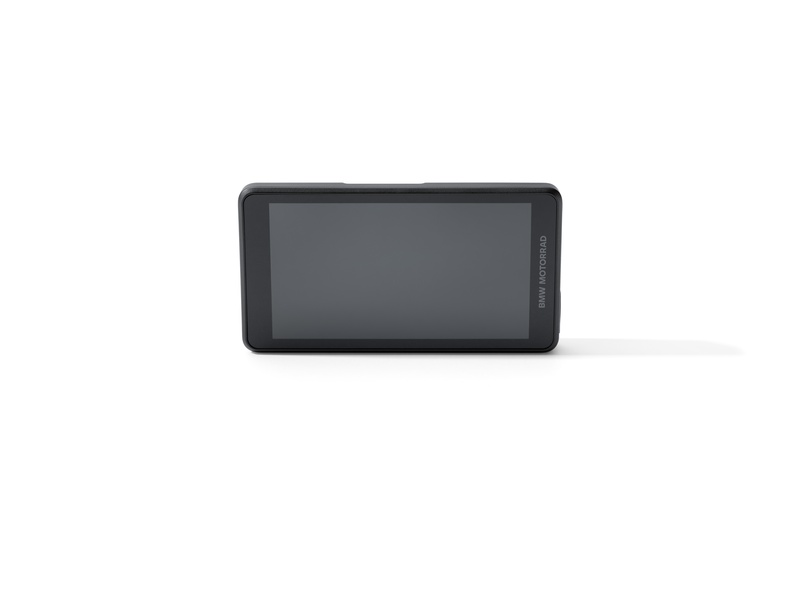
Research checked November 16, 2026. Product photographs are manufacturer-supplied editorial images, not photographs of my own units. Linked reviews reflect their authors’ experiences; specifications and app features can change.