Here’s the expensive misconception: upgrading from ChatGPT Free to Plus or Pro does not make your prompts private by default.
Free, Plus, and Pro are personal accounts. On all three, “Improve the model for everyone” starts turned on. Paying $20, $100, or $200 a month buys more capability. It does not buy organization-level control over how employees handle company data.
That line moves when you enter a managed Business or Enterprise workspace. And even then, “Enterprise” does not automatically mean HIPAA-eligible.
Disclaimer: ChatGPT tiers, prices, models, limits, and compliance features change frequently. This article reflects OpenAI’s official published information as of August 27, 2026. Verify current details on OpenAI’s pricing page and applicable privacy, security, and contractual documentation before making purchasing or compliance decisions.
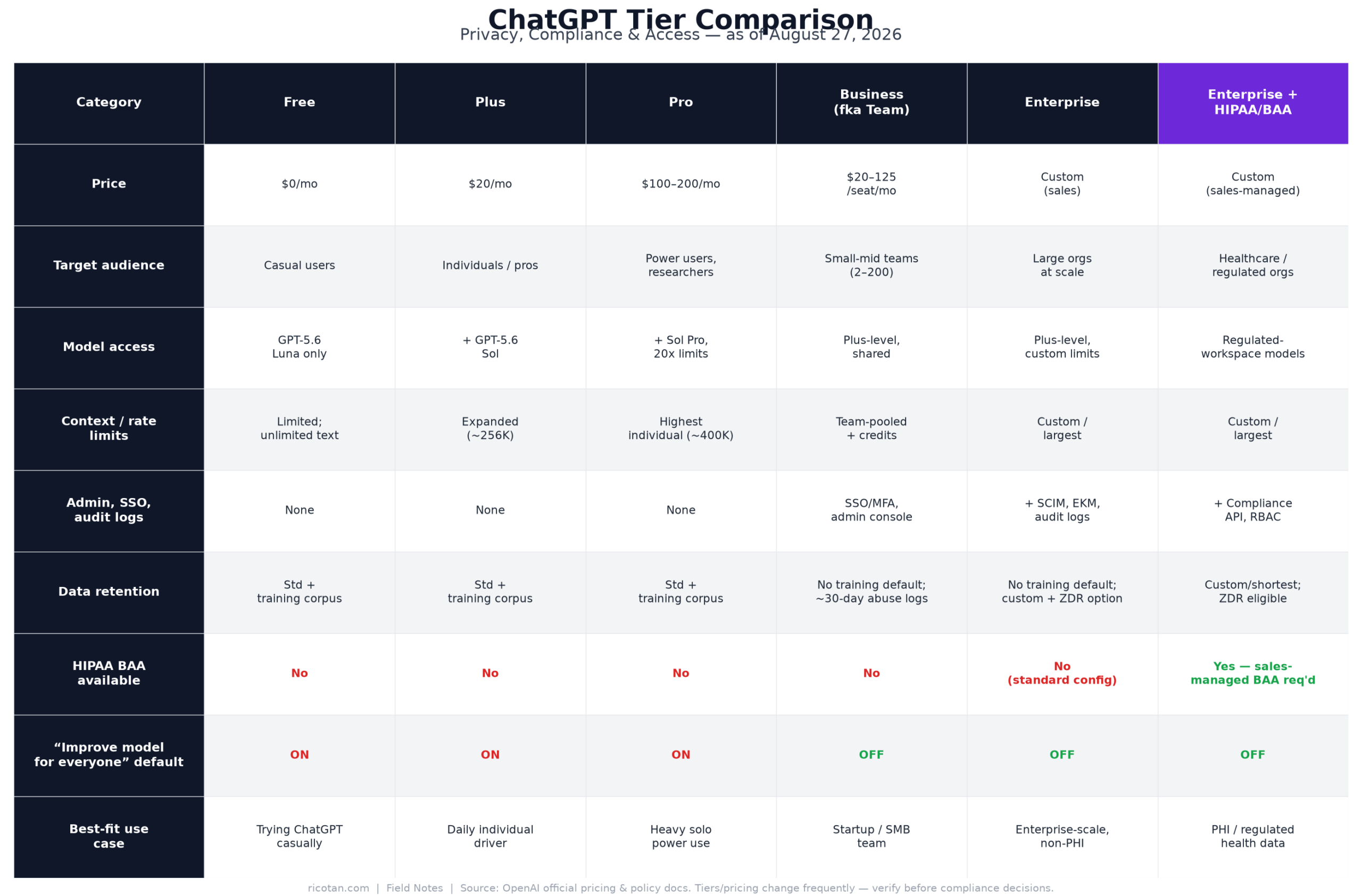
Full seven-tier breakdown at a glance. Table version below for screen readers and quick copy/paste.
| Free | Plus | Pro | Business (formerly Team) | Enterprise | Enterprise + Regulated Workspace / ChatGPT for Healthcare | |
|---|---|---|---|---|---|---|
| Price | $0 | $20/month | $100/month for 5× Plus usage or $200/month for 20× | Standard: $20/user/month billed annually or $25 monthly. Premium: $100 annually or $125 monthly. Two-seat minimum | Custom, contact sales | Custom, sales-managed |
| Target audience | Casual individual use | Individual professionals | Heavy individual users, researchers, and developers | Small and midsize teams | Larger organizations with advanced security and compliance requirements | Healthcare providers, health systems, health-tech companies, and other organizations putting PHI in scope |
| Model access | GPT-5.6 Luna; no Sol or Sol Pro | GPT-5.6 Sol reasoning and broader paid access | GPT-5.6 Sol Pro and the highest individual-tier access | Plus capabilities inside a managed workspace; Premium adds substantially more usage | Expanded models, context, files, and organizational entitlements | Enterprise-grade access with certain features disabled or restricted for regulated use |
| Context / rate limits | Unlimited plain-text Luna chats, subject to abuse guardrails; tight tool caps; limited memory and context | Expanded limits; approximately 54K instant and 256K reasoning context | 5× or 20× Plus usage; approximately 128K instant and 400K reasoning context | Standard and Premium usage levels; higher team-oriented allowances | Larger limits and negotiated capacity | Configured around the regulated environment and approved functionality |
| Admin / SSO / audit logs | None | None | None | Admin console, SAML SSO, MFA, centralized billing, basic analytics; lighter audit and provisioning controls | SSO, SCIM, RBAC, domain verification, analytics, compliance logs, EKM, data residency | Enterprise controls plus regulated defaults, RBAC, Compliance API, and healthcare-specific controls |
| Data retention | Saved history remains until deleted; Temporary Chats may be retained up to 30 days | Same personal-account posture | Same personal-account posture | No training by default, but not zero retention; monitoring and operational retention still apply | Custom retention options; not ZDR by default | Shorter/custom retention options; approved ZDR is available only for eligible API endpoints and configurations |
| HIPAA BAA availability | No | No | No | No | Not for a standard workspace by default | Yes, with the correct sales-managed product and an executed BAA |
| “Improve the model for everyone” default | On | On | On | Off for workspace data | Off for workspace data | No training by default within the covered environment |
| Best-fit use case | Personal experimentation with non-sensitive data | Individual productivity using non-regulated data | High-volume individual work using non-regulated data | Default work tier for many small and midsize organizations | Organization-wide deployment requiring lifecycle, audit, residency, and compliance controls | The sanctioned ChatGPT path when PHI is involved |
OpenAI also offers the $8-per-month Go plan. From a governance perspective, treat it like the other personal tiers: user-controlled account, no enterprise administration, no BAA, and training opt-out rather than organization-enforced protection. It does not change the decision framework below.
Free: Useful, Generous, and Absolutely Not an Enterprise Deployment
ChatGPT Free costs nothing and now includes unlimited plain-text conversations using GPT-5.6 Luna, subject to abuse guardrails. That is a meaningful upgrade from the old pattern where users hit a flagship-model cap and were quietly downgraded.
But “unlimited chat” is not “unlimited ChatGPT.”
Uploads, images, voice, deep research, data analysis, Codex, and agent-style work each have separate, tighter limits. Free users also get smaller context capacity and reduced memory compared with paid plans. OpenAI’s current ChatGPT pricing comparison lists a roughly 27K instant context window and describes memory and context as limited.
For an individual testing prompts, summarizing public material, or drafting a grocery list, that is fine.
For an organization, the problem is not Luna’s context window. It is the complete absence of governance.
There is no admin console, SSO enforcement, role management, offboarding workflow, organization-level usage visibility, or audit trail. If an employee signs up with a personal email and pastes in a customer contract, IT may never know the account exists.
Training use is on by default. The user can disable it under Settings > Data Controls > Improve the model for everyone, but you cannot enforce that from your identity platform. Free also has no HIPAA BAA and no priority support.
Best fit: personal experimentation with public, synthetic, or otherwise non-sensitive information. It is not an approved home for company data, client data, donor records, employee records, security logs, or PHI.
Free software is rarely free. Sometimes your governance team gets the invoice.
Plus: Better Tools, Same Personal-Account Problem
ChatGPT Plus is $20 per month. It adds GPT-5.6 Sol reasoning, expanded messages and uploads, stronger image generation, more deep research, larger memory and context, scheduled tasks, custom GPTs, Projects, Sites, and broader Codex and ChatGPT Work access.
That makes Plus genuinely useful. For a consultant, developer, analyst, or executive using AI heavily, it is often the practical individual tier.
But Plus does not cross the institutional privacy boundary.
“Improve the model for everyone” remains on by default. The subscriber must turn it off manually in Data Controls. There is no admin who can verify the setting across 200 personal accounts, no SSO policy that forces employees into an approved workspace, and no centralized offboarding when somebody leaves.
There is also no SAML SSO, SCIM, compliance log, organization-wide retention policy, or HIPAA BAA.
This is why reimbursing employees for Plus is not an AI deployment strategy. It is Bring Your Own AI with a nicer expense report.
Best fit: professionals using non-regulated information where the organization is comfortable with an individually managed account. If company data is allowed at all, you need a written policy defining what may be entered, and you are still accepting weak enforcement.
Pro: More Compute Is Not More Governance
ChatGPT Pro is the highest individual tier. Current options start at $100 per month for roughly five times Plus usage and extend to $200 for roughly twenty times Plus usage.
You get GPT-5.6 Sol Pro, priority access, maximum deep research and Codex usage, faster image generation, expanded agent mode, larger Projects, and research previews. OpenAI lists approximately 128K instant context and 400K reasoning context, versus 54K and 256K on Plus. “Unlimited” features remain subject to abuse guardrails.
If you are a researcher, programmer, or analyst repeatedly hitting Plus limits, Pro may be worth every dollar.
It still does not make the account enterprise-managed.
The training default is the same as Free and Plus: on. The user must opt out. There is still no SSO enforcement, SCIM provisioning, audit logging, centralized retention control, or BAA.
This matters because organizations often confuse model capability with security posture. Pro is more capable than Plus. It is not more governable.
Best fit: individual power users working with non-regulated data who can justify the additional capacity. Do not approve Pro for PHI because “it’s the top plan.” It is the top personal plan. That last word is doing a lot of work.
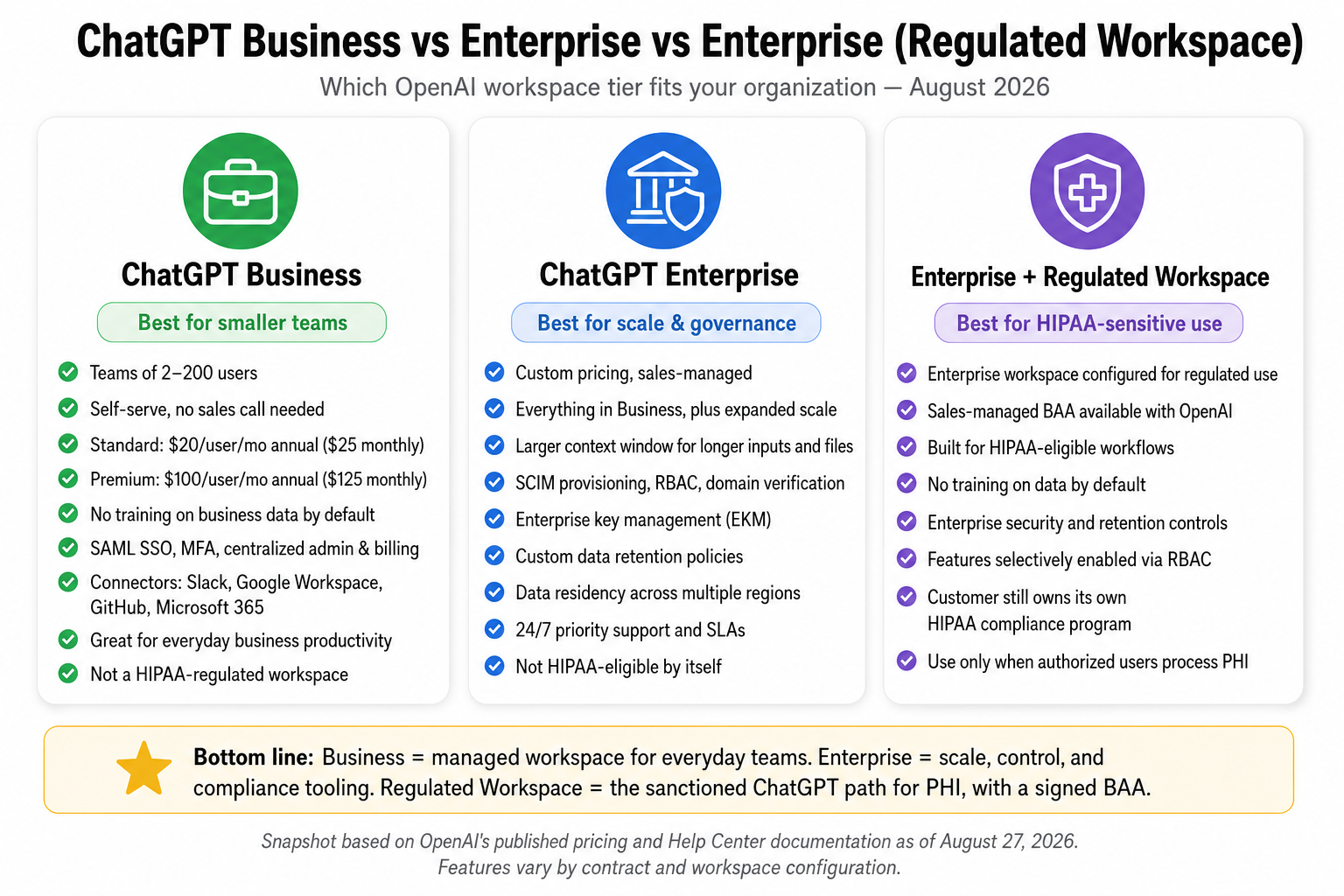
The three tiers that actually matter once you leave personal accounts behind — Business, Enterprise, and the HIPAA-eligible Regulated Workspace.
Business: Where the Privacy Default Finally Flips
ChatGPT Business, formerly called Team, is the first tier that materially changes the organizational equation.
Standard seats cost $20 per user per month when billed annually or $25 monthly. Premium seats cost $100 annually or $125 monthly and provide substantially more usage without the same five-hour limits. Business starts at two seats and supports self-service deployment for smaller and midsize organizations.
The big feature is not another model.
It is control.
Business provides a dedicated workspace, admin console, centralized billing, SAML SSO, MFA, basic usage analytics, connectors, shared workspace resources, and workspace agents. It gives IT an actual place to govern users instead of hoping everyone configured a personal account correctly.
Most importantly, OpenAI does not train on Business workspace inputs and outputs by default. Its policy on how customer data is used to improve models draws this line between individual services and business products. OpenAI’s Enterprise Privacy commitments similarly state that business data is not used for model training by default.
An administrator may deliberately opt into certain data-sharing programs, but that requires an affirmative choice. The default has flipped.
Business also includes SOC 2 Type 2 coverage and useful baseline controls, but it is not Enterprise Lite with every compliance feature. SCIM, advanced RBAC, enterprise key management, full compliance logging, IP allowlisting, and extensive data-residency controls remain Enterprise territory.
And Business is not HIPAA-eligible. There is no BAA for a self-service Business workspace.
Best fit: startups, professional firms, nonprofits, and midsize teams that need a managed workspace, SSO, centralized ownership, and no training on company content by default—but do not need the full compliance stack or plan to process PHI.
For many organizations, this should be the default work tier. Not Plus. Not a reimbursement free-for-all. Business.
Enterprise: Governance at Scale, but Not Automatic HIPAA
ChatGPT Enterprise builds on Business with the controls security teams usually start asking for during a real deployment: SCIM provisioning, role-based access control, domain verification, compliance and audit logs, analytics, enterprise key management, IP controls, data residency across multiple regions, custom retention windows, larger file and context limits, invoicing, service commitments, and priority support.
Pricing is custom. OpenAI wants a sales conversation because contract terms, capacity, support, regional requirements, and security architecture vary by customer.
Training remains off by default, but Enterprise makes that posture enforceable at the workspace level. That is very different from sending every employee instructions on how to find a toggle and hoping they comply.
SCIM alone can justify the move for larger organizations. When someone leaves, their AI access should leave with them. Their account should not remain attached to a personal email, filled with company context, memories, uploaded files, and custom workflows.
Custom retention is another major distinction. You can align the workspace more closely with legal, records-management, and security requirements instead of inheriting a consumer product’s defaults.
But standard ChatGPT Enterprise is not automatically HIPAA-eligible.
Let me repeat that because this is where expensive mistakes happen: buying Enterprise does not, by itself, authorize you to put PHI into ChatGPT.
Enterprise is the right fit for large organizations that need identity lifecycle management, compliance reporting, data residency, advanced security controls, and formal support. If PHI is in scope, you need the next product and the right contract.
Enterprise + Regulated Workspace and ChatGPT for Healthcare: The HIPAA Gate
OpenAI’s HIPAA-eligible ChatGPT options include ChatGPT Enterprise with Regulated Workspace and ChatGPT for Healthcare. These are sales-managed offerings, not self-service upgrades.
A Regulated Workspace begins with Enterprise capabilities but applies preconfigured restrictions intended for regulated use. Features that may create compliance problems are disabled by default. Administrators can selectively enable approved functionality through RBAC when it is appropriate for non-PHI workflows or covered under the organization’s configuration.
ChatGPT for Healthcare adds healthcare-specific capabilities for clinicians, administrators, and researchers, including trusted clinical search. OpenAI documents the covered products and feature differences in its help-center article, “HIPAA eligible products and functionality”.
Covered functionality can include SSO, admin controls, RBAC, the Compliance API, chat with files, voice, image generation, Python and Canvas tools, Projects, applications, and selectively configured memory. “Can include” matters. The BAA, product configuration, enabled features, and intended workflow must agree.
You also need an executed Business Associate Agreement. A salesperson saying the platform “supports healthcare” is not a BAA. A security questionnaire is not a BAA. Paying an Enterprise invoice is not a BAA.
For API-based healthcare applications, OpenAI provides a separate BAA request process, and retention eligibility depends on the endpoints and approved configuration.
Even with the right workspace and BAA, the customer remains responsible for its own HIPAA compliance program: risk analysis, minimum-necessary access, workforce training, access reviews, incident response, vendor management, and correct configuration.
A BAA makes OpenAI a contracted business associate for covered services. It does not sprinkle compliance dust over your organization.
Best fit: hospitals, clinics, healthcare-adjacent nonprofits, health-tech companies, and any covered entity or business associate that intends to process PHI through ChatGPT.
“Improve the Model for Everyone” Is a Training Control, Not a Cloaking Device
When “Improve the model for everyone” is on, OpenAI may use your conversations to train and improve its models. Content selected for that process may also be reviewed by authorized OpenAI personnel or contractors.
The default split is straightforward:
- Free, Go, Plus, and Pro: on by default because they are personal services.
- Business, Enterprise, Edu, and API: training is off by default.
OpenAI explains this distinction in “How your data is used to improve model performance”.
On a personal account, turn it off through:
- Settings
- Data Controls
- Disable Improve the model for everyone
The preference syncs across devices. You can also submit a “do not train on my content” request through OpenAI’s Privacy Portal or use Temporary Chat for individual conversations. OpenAI’s Data Controls FAQ describes these options.
Now for the part most privacy summaries skip: turning off training does not make the interaction disappear.
First, the setting applies going forward. It does not retroactively remove existing chats, delete saved memories, or unwind content already incorporated into a completed training process. History and memory are separate controls. Delete them separately if that is your intent.
Second, Temporary Chats and opted-out interactions may still be retained for up to 30 days for abuse monitoring. Temporary Chat keeps the conversation out of your visible history and excludes it from training. It does not create an invisible tunnel through OpenAI’s infrastructure.
Third, safety systems may use limited, safety-relevant context in rare high-risk situations regardless of your training preference. The training toggle governs model improvement. It does not disable safety controls or every possible form of authorized review.
Fourth, API inputs and outputs are generally retained in abuse-monitoring logs for up to 30 days even though API data is not used for training by default. OpenAI’s API data-control documentation explains the distinction between training, abuse-monitoring retention, application state, and Zero Data Retention.
True Zero Data Retention is a separate, approval-based configuration for eligible organizations and eligible API endpoints. It is not the default on Enterprise, and it does not cover every service. Assistants, threads, vector stores, fine-tuning, and batch workflows can have different eligibility or retention requirements. OpenAI’s announcement on Zero Data Retention for frontier models describes the program’s controlled availability.
Legal obligations and severe-risk investigations may also require longer retention under OpenAI’s safety-retention rules.
Here’s what actually matters: training, retention, human access, memory, safety review, and legal preservation are different controls.
One toggle does not control all six.
The Free Tier’s Real Limits
The new Free plan is generous enough to confuse people.
As of the August 2026 rollout, plain-text conversations using GPT-5.6 Luna are unlimited, subject to abuse protections. Users can invoke deeper reasoning through a Think option, but they remain on the Luna tier. Free does not provide normal access to GPT-5.6 Sol, Sol Pro, or the higher reasoning tiers.
The constraints appear when work becomes more than plain text. File uploads, image creation, voice, data analysis, deep research, Codex, and agent mode have separate caps. Response priority can also fall during periods of heavy demand.
Free memory is limited. Its instant context is approximately 27K, with much less practical room available for user input after system instructions, tools, memory, and internal processing are counted. That is enough for everyday questions. It is not a dependable document-analysis pipeline.
There are no administrators, roles, SSO policies, audit logs, usage reports, data-residency controls, or priority support. Training is on by default. No BAA is available.
The problem is not that Free is bad. It is excellent for what it is.
The problem is pretending that a consumer account becomes an enterprise control plane because an employee used it productively three times.
Privacy & Security Takeaways
If you are the CISO, CTO, or Chief AI Officer, stop organizing your policy around model names. Organize it around account ownership, data classification, and enforceability.
The first risk is shadow AI. Employees will use whatever removes friction. If the approved tool takes six months to deploy while ChatGPT takes 30 seconds to join, congratulations: your AI program already launched. You just do not govern it.
Personal Plus and Pro accounts make that problem harder to see because they look professional. An employee pays, gets better models, disables training—or thinks they did—and begins treating the account like an approved work platform.
IT still cannot enforce the toggle, prove its state, review usage, revoke access cleanly, preserve records, or prevent data from living inside a personal identity.
The real dividing line is not Free versus paid. It is personal account versus managed workspace.
Business is where training switches off by default and administrative control begins. Enterprise is where identity lifecycle, auditability, residency, retention, and compliance tooling become serious.
Even then, “not used for training” is not the same as zero retention. Abuse-monitoring and operational-retention windows can still apply. If your risk assessment requires ZDR, negotiate it explicitly, confirm endpoint eligibility, and document the exceptions. Do not infer it from a marketing adjective.
For HIPAA, create a bright red line:
- No PHI in Free, Go, Plus, Pro, or Business.
- No PHI in standard Enterprise merely because it has strong security controls.
- PHI goes only into a specifically approved Regulated Workspace, ChatGPT for Healthcare environment, or properly configured API service covered by an executed BAA.
- Every enabled feature must be evaluated against the covered service and the organization’s minimum-necessary standard.
A practical policy is simple:
- Personal tiers: experimentation only, using public or synthetic information.
- Business: normal company work with approved data classifications.
- Enterprise: higher-risk organizational work requiring full governance.
- Regulated Workspace or Healthcare: PHI, and only after security, privacy, legal, and compliance approval.
You do not need a 90-page AI policy to state those boundaries. You need four lines people can understand and controls that make the lines real.
Which Tier Should You Actually Use?
You are a solo consultant or freelancer: Use Plus for normal professional work with non-sensitive information. Disable model training immediately. Move to Pro only if you consistently hit Plus limits and the extra capacity has measurable value. Do not place regulated client data, credentials, private security logs, or PHI into either tier.
You are a 10-person startup or small firm: Use Business Standard as the default. Put everyone in the managed workspace, require MFA or SSO, centralize billing, and prohibit company work in personal accounts. Give Business Premium only to users who can justify the heavier usage. Paying five times more for every seat because two developers hit a limit is how SaaS budgets become folklore.
You are a 200-person nonprofit or company: Start with Enterprise evaluation. You probably need SCIM, lifecycle management, compliance logs, domain control, retention policy, data residency, formal support, and a real security review. Business may still work for a lower-risk organization, but validate offboarding, audit, legal-hold, connector, and records-management requirements before choosing based on seat price alone.
You touch PHI or regulated health data: Use ChatGPT Enterprise with Regulated Workspace, ChatGPT for Healthcare, or an approved API configuration with a signed BAA. Involve security, privacy, compliance, and counsel before production use. Define which features are allowed, who receives access, what data is necessary, how prompts are logged, and how incidents are handled.
You are still experimenting: Free is fine—with public or synthetic data. The moment real company or customer information enters the workflow, experimentation has become deployment. Govern it accordingly.
The Blunt Final Take
Plus and Pro buy capability. Business buys a managed boundary. Enterprise buys deeper control. A Regulated Workspace plus a BAA creates the contractual path for PHI.
Those are different purchases.
If your AI policy says “paid ChatGPT accounts are approved,” rewrite it. You have confused a credit-card charge with a security control.
The model is rarely the biggest risk. The unmanaged account around it is.